Aptabase vs Countly vs d8a.tech
These three tools all promise privacy-respecting, self-hostable analytics, but they optimize for different buyers. Aptabase is the leanest option, built for…
Freemium · From Free (up to 20,000 events/month)
Best for: Indie developers and small product teams who want simple, anonymous event analytics across mobile, desktop, and web apps with a generous free tier and no cookies or device fingerprinting.
Freemium / Subscription · From Free (Community Edition); Flex plans from $175/month
Best for: Product teams that want analytics, crash reporting, push notifications, and A/B testing bundled into a single platform and are willing to pay for a managed private-cloud or self-hosted Enterprise tier.
Freemium / Open Source · From Free
Best for: Engineering-led teams in regulated industries like healthcare, finance, or government that already operate a data warehouse and want GA4/Matomo-compatible ingestion with full data ownership rather than a vendor-controlled dashboard.
At a Glance
| Aptabase | Countly | d8a.tech | |
|---|---|---|---|
| Primary category | Analytics | Analytics | Analytics |
| Rating | Not documented | Not documented | Not documented |
| Pricing model | Freemium | Freemium / Subscription | Freemium / Open Source |
| Starting price | Free (up to 20,000 events/month) | Free (Community Edition); Flex plans from $175/month | Free |
| Free plan | Yes | Yes | Yes |
| Free trial | Not documented | Yes | Not documented |
| Platforms | Web, iOS, Android, Mac, Windows | Web, iOS, Android | Web |
| Team collaboration | Not documented | Not documented | Not documented |
| AI features | Not documented | Not documented | Yes |
| Public API | Yes | Yes | Yes |
Standout Differences
Aptabase optimizes for privacy and simplicity
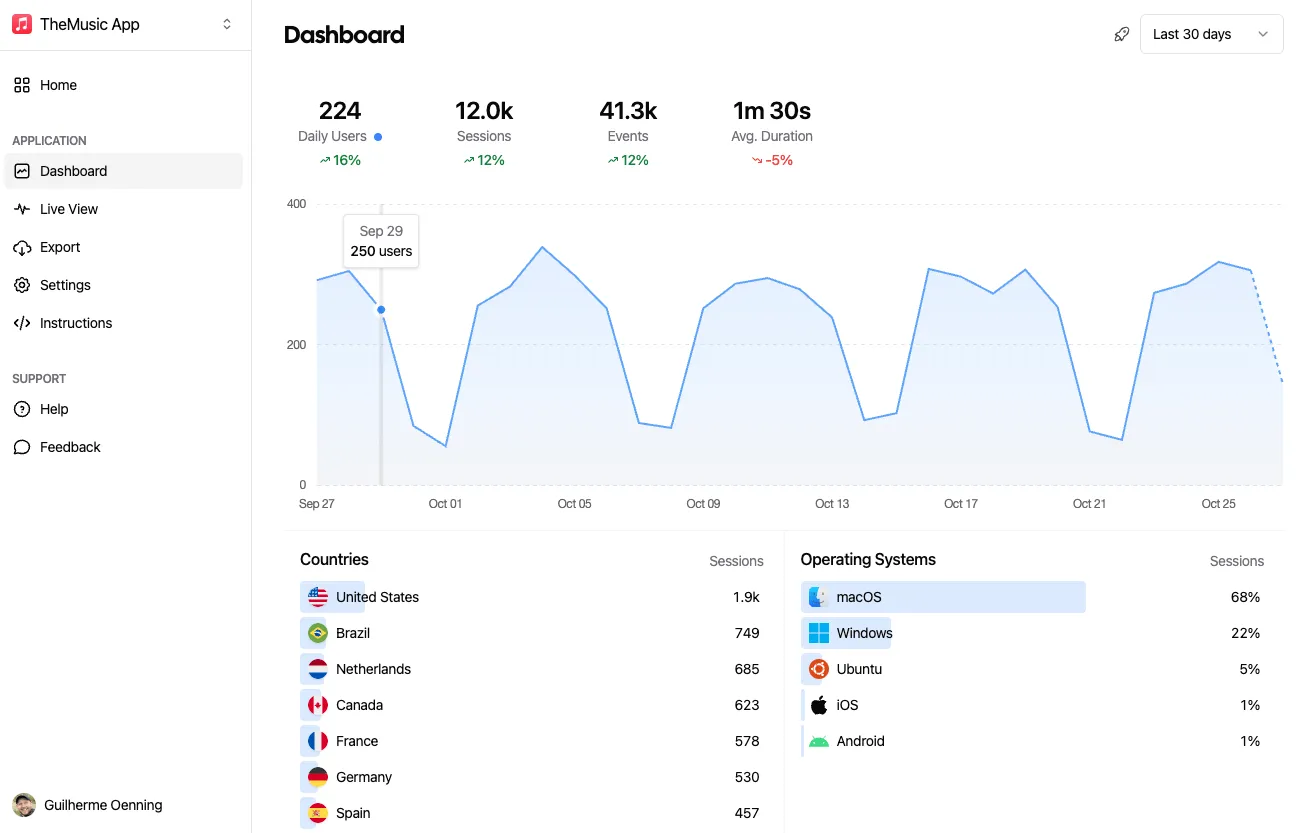
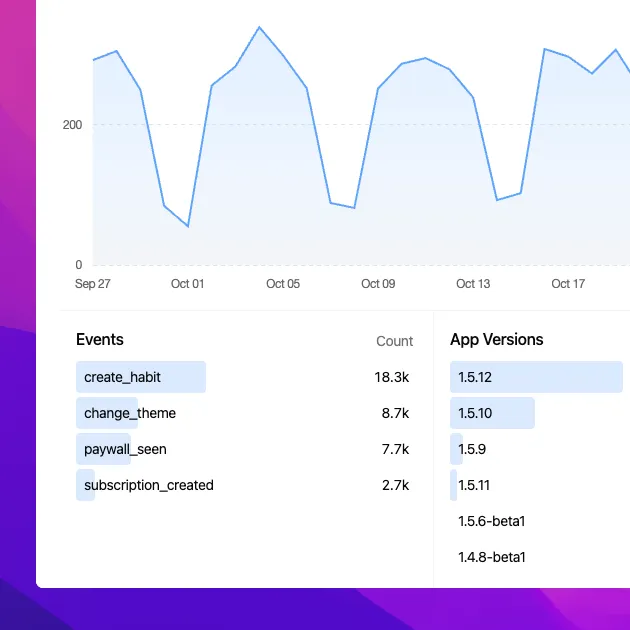
Aptabase tracks events with no cookies, device fingerprints, or personal identifiers, and offers a free tier of up to 20,000 events per month with no overage fees, appealing to privacy-conscious indie and small-team developers.
Aptabase
Countly is the most full-featured platform
Countly combines session and event analytics with crash reporting, push notifications, remote configuration, A/B testing, and a Compliance Hub for consent management, a broader feature set than either Aptabase or d8a.tech document.
Countly
d8a.tech is warehouse-native, not dashboard-first
Unlike Aptabase and Countly, which ship their own analytics dashboards, d8a.tech writes a normalized schema directly into ClickHouse, BigQuery, or flat files, meaning value depends on connecting it to a separate BI tool like dbt, Looker, or Metabase.
d8a.tech
All three offer a genuinely free, self-hostable core
Aptabase, Countly (Community Edition), and d8a.tech (MIT-licensed) can all be self-hosted at no license cost, though only Aptabase and d8a.tech also offer a free managed cloud tier without any self-hosting required.
Aptabase, Countly, d8a.tech
Maturity varies significantly
Countly was founded in 2012 and reports processing data for more than 5 billion identities across roughly 17,000 applications, while Aptabase (2023) and d8a.tech (2022) are newer projects, and d8a.tech's native web tracker is explicitly still in beta.
Countly, Aptabase, d8a.tech
Feature-by-Feature
Deployment and Data Ownership
| Feature | Aptabase | Countly | d8a.tech |
|---|---|---|---|
| Free self-hosted open-source edition | Available | Available | Available |
| Free hosted cloud tier (no self-hosting required) | Available | Unavailable | Available |
| Warehouse-native export (ClickHouse, BigQuery, S3, etc.) | Not documented | Not documented | Available |
Analytics and Engagement Features
| Feature | Aptabase | Countly | d8a.tech |
|---|---|---|---|
| Crash and error reporting | Unavailable | Available | Unavailable |
| Push notifications and A/B testing / remote config | Unavailable | Available | Unavailable |
| Real-time live event dashboard | Available | Not documented | Not documented |
Compatibility and AI
| Feature | Aptabase | Countly | d8a.tech |
|---|---|---|---|
| GA4 / Matomo tracking-protocol compatibility | Unavailable | Unavailable | Available |
| AI-assisted natural-language analysis | Unavailable | Available | Available |
Pricing Compared
Starting price reflects the lowest paid tier, not the full cost for every team size or usage level.
Aptabase
Countly
d8a.tech
Pros & Cons
Aptabase
Pros
- Fully open source and self-hostable at no cost
- Privacy-first design with no cookies or device fingerprinting
- Broad SDK coverage across mobile, desktop, and web platforms
- Generous free tier (20,000 events/month) with no overage fees
Cons
- Smaller and newer than established analytics platforms, so advanced behavioral analytics (deep funnels, cohorts) are more limited
- Anonymity-by-design means less granular per-user tracking than identity-based analytics tools
- Exact paid-tier pricing requires configuring event volume on the site rather than being listed upfront
Countly
Pros
- Strong focus on data ownership and privacy with self-hosting options
- Combines analytics, crash reporting, and engagement tools in one platform
- Free, open-source Community Edition available for smaller teams
- Broad SDK coverage across mobile, web, and desktop platforms
- Usage-based rather than seat-based pricing on the Flex plan
Cons
- Commercial pricing starts relatively high for smaller teams ($175/month)
- Enterprise (self-hosted) tier requires custom pricing and sales contact
- Advanced personalization and AI features are add-ons on the Flex plan rather than included by default
- Self-hosting the Community Edition requires infrastructure and DevOps effort
d8a.tech
Pros
- Full data ownership with no vendor lock-in into a third-party analytics dashboard.
- Free to self-host indefinitely under a permissive MIT license.
- Drop-in compatibility with existing GA4/Matomo tracking reduces migration effort.
- Self-hosted and air-gapped options make it attractive for regulated industries.
Cons
- Requires warehouse infrastructure knowledge (ClickHouse/BigQuery) to get full value.
- Native web tracker is still in beta.
- Limited third-party reviews and public track record given its early stage.
- No polished built-in BI or visualization layer; relies on external dashboards.
Use Cases
Aptabase
- Mobile app analytics — Track feature usage and events in native iOS and Android apps without collecting personal data.
- Desktop app telemetry — Monitor usage in Electron or Tauri desktop applications.
- Privacy-compliant web analytics — Add anonymous event tracking to web apps while staying aligned with GDPR/CCPA.
Countly
- Mobile app product analytics — Product teams tracking user behavior, crashes, and engagement across iOS and Android apps.
- Privacy-regulated industries — Organizations that need first-party, self-hosted analytics to meet data residency or compliance requirements.
- Customer engagement campaigns — Teams using push notifications, remote configuration, and A/B testing to drive engagement.
d8a.tech
- Privacy-first web analytics for regulated industries — Organizations needing GDPR/HIPAA-aligned data residency can self-host d8a on-premises or air-gapped, keeping clickstream data within their own infrastructure while still using familiar GA4/Matomo tracking.
- Warehouse-native analytics for data teams — Teams already running BigQuery or ClickHouse can pipe web analytics directly into their warehouse via d8a instead of exporting from GA4, simplifying joins with other business data.
- Free GA4 alternative for cost-conscious teams — Teams wanting to avoid GA4 data limits or Google's data handling can switch to d8a's free EU cloud tier with minimal tracking code changes.
Screenshots
Aptabase
Countly

Frequently Asked Questions
Which of these three is the cheapest for a solo developer just starting out?
Aptabase, since it offers a free tier of up to 20,000 events per month with unlimited apps and no overage fees, aimed specifically at indie developers and small teams.
Can I migrate my existing Google Analytics 4 setup to any of these?
d8a.tech is purpose-built for this: it ingests events using the same GA4 Measurement Protocol and Matomo tracking API already in use, so existing tracking snippets can be redirected with minimal code changes.
Which tool includes crash reporting and push notifications?
Countly is the only one of the three that documents crash and error reporting alongside push notifications, remote configuration, and A/B testing.
Do any of these require me to already run a data warehouse?
d8a.tech does. Its core value depends on writing data into a warehouse like ClickHouse or BigQuery and then querying it with a separate BI or dashboard tool, whereas Aptabase and Countly both ship their own built-in dashboards.
Which platform has the longest track record?
Countly, founded in 2012, with a reported infrastructure processing data for more than 5 billion unique identities across roughly 17,000 applications. Aptabase (2023) and d8a.tech (2022) are considerably newer.
Is any of these truly anonymous with no personal data collected?
Aptabase is explicitly designed this way, with no cookies, device fingerprints, or personal identifiers used to track users. Countly and d8a.tech do not make the same anonymity-by-design claim in the available data.
Related Comparisons
- Ackee vs d8a.tech vs HitKeep
- Aptabase vs Countly Community Edition vs d8a.tech
- Aptabase vs Countly vs HitKeep
Read the full Aptabase review · Read the full Countly review · Read the full d8a.tech review